

Wingware Early Access Program
Wing 12 is now available as an early access release for AI agent driven development!
You can participate in this program simply by downloading and using the early releases of Wing. We ask only that you keep your feedback and bug reports private by submitting them through Wing's Help menu or by emailing us at support@wingware.com.
 Wing 12.0.0.4 Beta: June 18, 2026
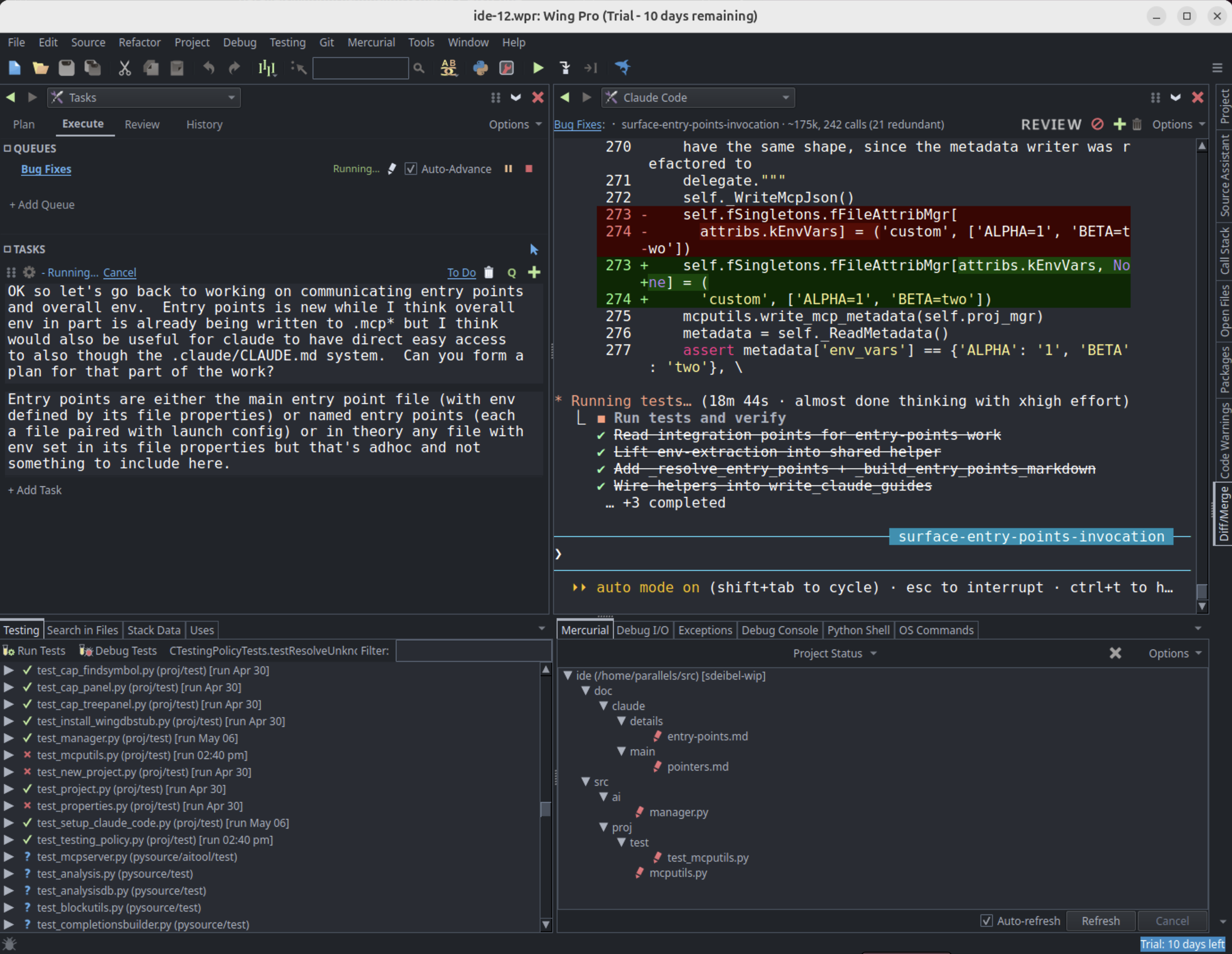
Wing 12 introduces deep integration with AI coding agents, starting with Claude Code. This includes a dedicated Claude Code tool, a new Tasks tool for planning, executing, and reviewing AI agent work, and a set of MCP servers that allow agents to work more efficiently by using Wing's source code analysis, unit testing, and debugging features.
For those using Claude Code, Wing 12 broadens the focus from code-centric direct development to also include managing the work of multiple concurrent AI agents. Of course all of Wing's classic IDE features are still available -- the powerful debugger, deep code analysis and warnings, full-featured editor, project & package management, and much more.
Wing 12 also adds true pseudo-terminal support to OS Commands and Debug I/O, re-envisions the OS Commands tool so that commands can be dragged to tool or editor splits, reorganizes the Tools menu, adds search and back/forward navigation to the Preferences dialog, supports automatic test discovery, speeds up detection of externally modified files, and makes many other improvements.
Note that Wing 12 discontinues Wing Personal (details below) and drops support for Python 2.x, CVS, and Subversion.
Measured Speed and Cost Improvements
We benchmarked performance of Claude Code across 12 paired Python coding tasks on real Python codebases, with and without access to Wing 12's MCP servers. Claude+Wing won 8 tasks outright, tied 3, and lost only 1 -- a short session on a small codebase.
A few highlights, using full-price API rates for comparison (actual cost with a Claude Code subscription is far less):
- Enumerating production callers of a generically-named method in a 25,000-line file: roughly $0.43 with Wing vs $1.02 using plain search, with both arms finding all 9 callers.
- Reading an exact runtime value from inside a paused test: a single Wing debug call at roughly $0.12, about 11x cheaper than reconstructing the run environment and writing a trace harness.
- A four-task session on Wing's own codebase (navigate, fix, rename, test, committing as you go): roughly $2.71 vs $4.14, about 35% cheaper and steadier across multiple runs.
Read the full benchmark write-up for details of the results and how the benchmarks were designed.
Product Line Changes
With Wing 12, Wingware is shifting its emphasis toward the new reality of AI agent assisted software development. As part of this, we are changing the product line and licensing, as follows:
(1) The Commercial and Non-Commercial licensing model is being retired. We are replacing it with a single Wing download that provides tiered access to IDE functionality, depending on the type of license purchased. The license types that will be available going forward are:
Wing Pro -- the full-featured Python IDE, including AI coding agent integration with Claude Code, the Tasks tool for managing agent work, the Code Actions, Write Tests, and FIX features, and everything in Wing Classic (requires a Claude Code subscription to use the AI agent features).
Wing Classic -- the same Python IDE for users that don't work with AI agents. Wing Classic keeps all the IDE features you're used to: the debugger, deep code analysis and warnings, refactoring, unit testing, remote development, the full-featured editor, project & package management, and the rest.
Both can be used for commercial development. Trial licenses provide time-limited access to the full-featured Wing Pro product.
Existing Non-Commercial Use licenses become Wing Pro. Customers who don't need AI agent capabilities may move to Wing Classic at renewal time, or any time sooner by contacting us at support@wingware.com.
(2) Wing Personal has been retired and will no longer be maintained. Wing Personal users can switch to Wing 101, which is still free, if its very scaled-back feature set is acceptable. After Wing 12 final release, Wing Personal users will also be able to purchase a Wing Classic license -- which includes many features that were not available in Wing Personal -- at a migration discount, offered through the Wing Personal's offer notification system.
(3) Wing 101 is still available as part of this early access offering but has virtually no functional changes from Wing 11. The lack of changes in Wing 101 is nothing new; as a tool for teaching beginning programmers, its feature set has been complete for many years.
Limitations
The following known limitations apply to the current early access release:
(1) The Claude Code integration does not yet work on remote hosts or inside containers. For now, Claude Code must run on the same host as Wing.
(2) We are not yet selling Wing Classic licenses. In the meantime, you can evaluate Wing 12 with a trial license, which provides full Wing Pro functionality. There is no limit on the number of trial licenses during the early access period.
(3) Running multiple instances of Wing at the same time may cause problems with Wing's Claude Code MCP servers.
Downloads
This is a beta release. Please try it and email us if you find problems or have suggestions!
Wing 12.0.0.4 -- Full featured Python IDE with two licensing tiers
Wing 101 12.0.0.4 -- Free IDE for teaching beginners to program
Wing 11 and earlier versions are not affected by installation of Wing 12 and may be installed and used independently. However, project files for Wing 11 and earlier are converted when opened by Wing 12 and should be saved under a new name, since Wing 12 projects cannot be opened by older versions of Wing.
New in Wing 12
AI Coding Agent Integration with Claude Code
Wing 12 adds a Claude Code tool that integrates the Claude Code AI coding agent with IDE functionality. A new Set Up for Claude Code item in the Project menu configures the active project for AI agent development and communicates to the agent how to work with the sources in your Wing project.
A set of MCP (Model Context Protocol) servers gives Claude Code access to Wing's source code analysis, testing, and debugger functionality, so the agent can more efficiently navigate and understand your code, write, run & fix unit tests, and use the debugger to diagnose difficult runtime errors.
Tasks Tool
The new Tasks tool lets you plan, queue up, execute, review, and audit the history of AI agent development tasks, making it easier to supervise multiple AI agents' work and inspect changes before committing them to revision control.
FIX Features and Write Tests
Wing 12 adds AI agent driven FIX features that hand off the current debugger bug, failing unit tests, or code warnings directly to Claude Code for resolution. New Write Tests items in the Testing menu and editor context menu prompt the agent to write unit tests for selected code.
Code Actions
Wing 12 also adds a set of higher-level AI code actions, accessed via the FIX icon in the editor toolbar, that operate on selected code or the enclosing scope. Built-in actions include explaining code, reviewing it for quality or security risks, fixing code warnings, optimizing for performance, and updating comments and docstrings. The action list is user-extensible, so you can add your own prompts for tasks you run often.
Pseudo-Terminal for OS Commands and Debug I/O
The OS Commands and Debug I/O tools now default to using a pseudo-terminal that implements full ANSI terminal emulation, so you can run and debug programs that use color output, cursor positioning, or full-screen TUIs.
Tools in Editor Splits
Tools can now be added or dragged to editor splits, not just in the tool areas, allowing for much more flexible workspace layout.
Along the same lines, the OS Commands tool has been redesigned so that commands may be dragged out to any tool or editor split.
Reorganized Tools Menu
The Tools menu has been reorganized into related groups, with an Other sub-menu for lesser-used or legacy tools, making the more commonly used tools easier to find.
Preferences Dialog Search and Navigation
The Preferences dialog now supports text search and back/forward navigation, making it easier to find and change settings.
Test Discovery
Wing 12 adds an Auto-Discover Test Files option in the Testing tab of Project Properties, so you usually don't need to specify test file patterns or add test files individually to the Testing tool.
Wing 12 also adds discovery of individual unit tests within files, using Discover Tests in Project in the Testing menu and Discover Tests in Selected Files in the Testing tool's context menu. This lets you find the tests you want to run much more easily, without running all the tests in a file.
Other Minor Features and Improvements
Wing 12 also prompts for SSH passphrases and HTTPS credentials when needed during VCS operations, detects externally modified files much more quickly and with reduced CPU load, saves and restores tool console scrollback across project close/reopen, fixes the Ignore checkbox in the Exceptions tool for exceptions in pseudo-files such as <input> or <string>, supports clickable OSC 8 hyperlinks in the OS Commands and Debug I/O consoles, and makes a number of other bug fixes and usability improvements.
Changes and Incompatibilities
The AI features originally introduced in Wing 11 (the AI Coder and AI Chat tools, used to set up and run individual queries against an LLM) are now considered legacy and hidden from the user interface in Wing 12. They remain available in projects that already use them, and can be re-enabled in the Projects > AI preferences area, for users that wish to continue using them.
If you have questions about any of this, please don't hesitate to contact us at support@wingware.com.